- Help Center
- Sales
- Sales Performance
Sales Analysis by Dimension Dashboard
Below you'll observe how to access and review your Sales Analysis by Dimension Dashboard...
- At the top of the Homepage, you'll observe the navigation tabs
- Select Category: Sales
- Select Subcategory: Sales Performance
- Scroll down to the Sales Analysis by Dimension Dashboard
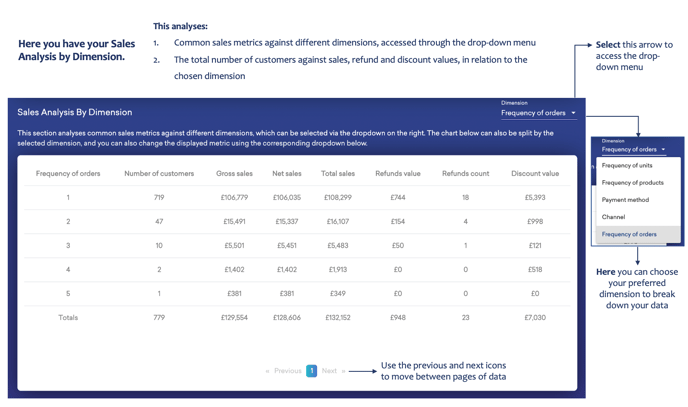
This analyses:
- Common sales metrics against different dimensions accessed through the drop-down menu
- The total number of customers against sales, refund, and discount values, in relation to the chosen dimension
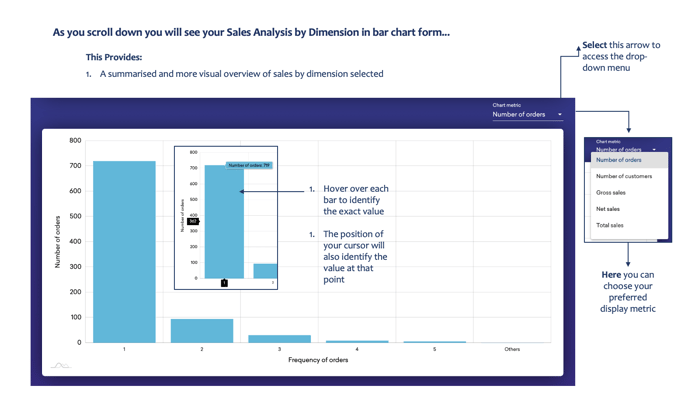
As you scroll down, you'll also be able to see your Sales Analysis by Dimension in bar chart form...
This Provides:
- A summarised and more visual overview of sales by dimension selected