Below you'll observe how to access and review your Order List Dashboard...
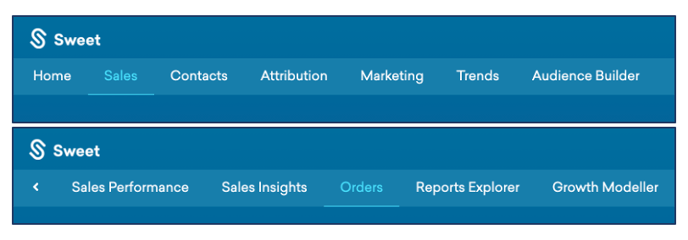
- At the top of the Homepage, you'll observe the navigation tabs
- Select Category: Sales
- Select Subcategory: Orders
- Scroll down to the Orders List Dashboard
This Provides:
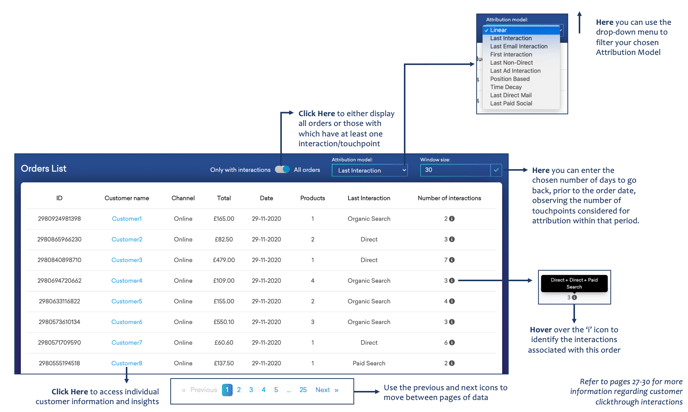
- A list of orders, filtered by the specified Attribution Model and window size
- The customer ID and name and their associated order, including; channel, order total, order date, and the number of products ordered
- The ability to filter results by interaction only
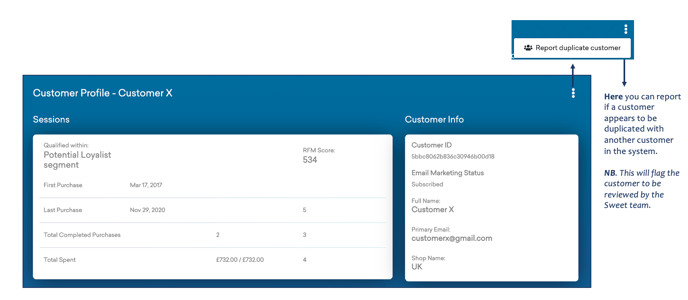
From the Orders List, you can select each Customer Name and access further customer information, insights and history...

This Provides:
- A Customer Profile – outlining their RFM Score, Purchase History, Total Expenditure.
- Additional customer information, such as Customer ID, Name, Email, and Email Marketing Status.
Click Here for our guide to Customer Clickthrough Dashboards.