Below you'll observe how to access and review your Customer Lookalikes Dashboard...
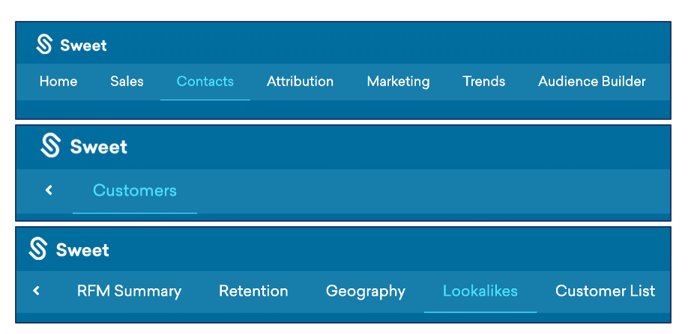
- At the top of the Homepage, you'll observe the navigation tabs
- Select Category: Contacts
- Select Subcategory: Customers
- Select Subcategory: Lookalikes
This identifies:
- Customers who match with prospects sharing similar demographics, enabling more effective campaign targeting.
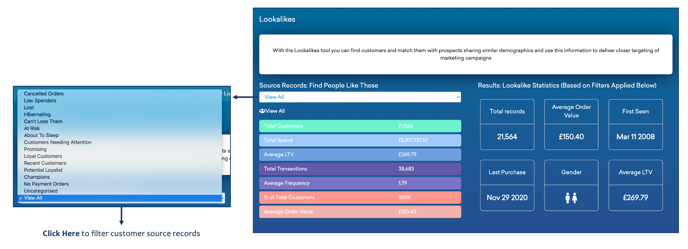
As you scroll down the Customer Lookalikes Dashboard…
You’ll observe:
- A fully customisable and detailed customer demographic dashboard, generating results that identify; the customer name, city, country, and segment.
- Individual customer purchasing activity, including; total spent and last purchase date.
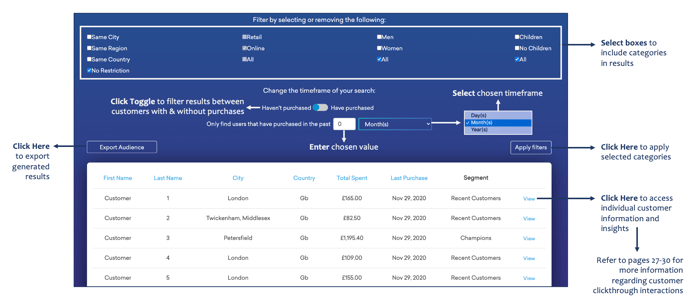
Please refer to the Customer Clickthrough Article for further guidance on accessing individual customer information and insights.