Below you'll observe how to create a New Audience though the Audience Creator Wizard...
- At the top of the Homepage, you'll observe the navigation tabs
- Select Category: Audience Builder
- Select the 'Create New Audience' Tab in the top right hand corner of the Audience Builder Dashboard
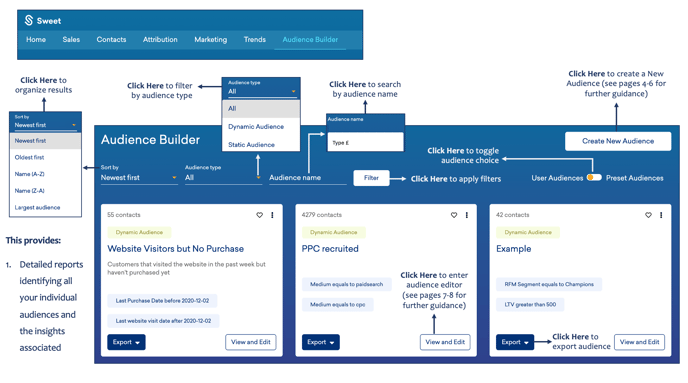
Once you enter the Audience Creator Wizard…
You’ll observe:
- The ability to create and customise specific dynamic or static audiences.
- Filtering functionalities enabling you to further segment the results.
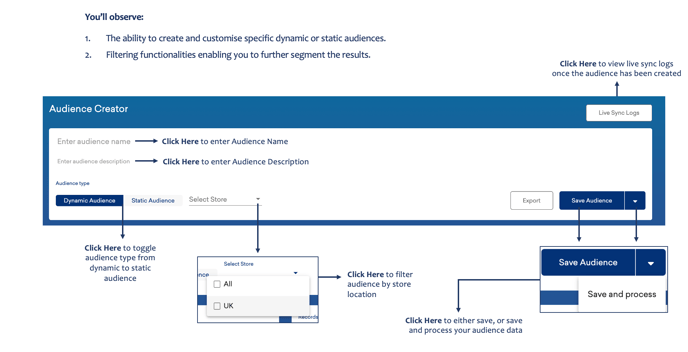
As you continue through the Audience Creator Wizard…
You’ll observe:
- Your audience filters, enabling you to adjust and apply to conditions and audience results and order.
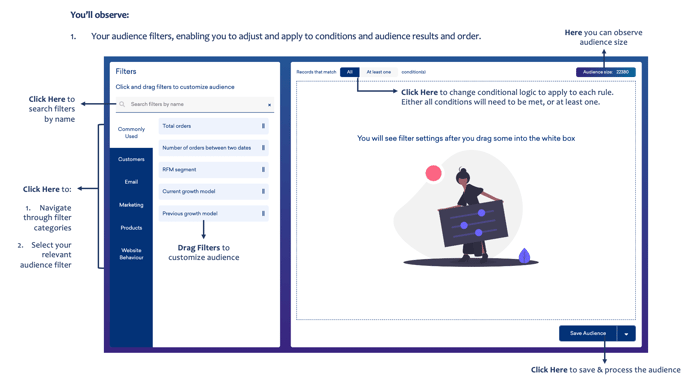
For guidance on how to access and review the Audience Builder, please click here.
For guidance on how to Edit an Audience, please click here.